Telemetry
The Agentic Development Toolkit (ADT) can send a small amount of anonymous usage data to help us understand which MCP tools are being used and where things fail. We collect usage statistics only. We do not collect anything that identifies you, your FileMaker file, your data, or your code.
Note Anonymous and aggregate Telemetry is keyed to a random ID generated on your machine the first time the adt-mcp server runs, and stored locally. It is not tied to your name, email, license, IP address, FileMaker account, file name, or any other personal or business identifier.
What we collect
When telemetry is enabled, ADT sends:
-
MCP session lifecycle events — when an MCP session starts and ends, the transport (
stdio), session duration, the agent client name and version (for example,Claude Code 1.2.3), and how many tool calls happened in the session. -
Tool call metadata — the tool name (for example,
troubleshoot_setup,execute_filemaker_sql), how long it took, and whether it succeeded or failed. -
Installer completion — installer UI used, platform, duration, exit code, whether telemetry was enabled, and the installer version.
-
A random anonymous ID — generated the first time the server runs and stored locally so repeat sessions from the same machine can be counted as one user.
-
The
adt-mcpserver version.
What we do not collect
ADT telemetry does not include:
-
FileMaker data of any kind — no record values, no field contents, no found sets.
-
Tool inputs or arguments passed to any MCP tool.
-
Tool outputs or return values.
-
SQL queries, layout names, table names, field names, or script names.
-
Error messages or stack traces.
-
File names, file paths, or anything about your project structure.
-
Your name, email, IP address, FileMaker account, or any other identifier.
When a tool call fails, we record only that the tool with that name failed and how long it took. The error itself stays on your machine.
How to opt in or opt out
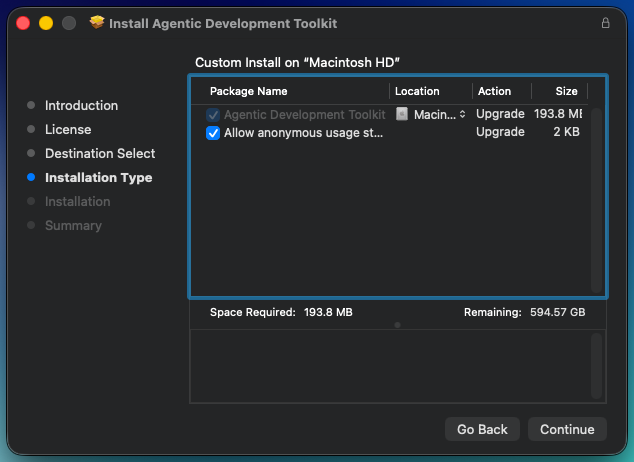
The simplest way to change your telemetry choice is to run the ADT installer again and check or uncheck the Allow anonymous usage statistics option.
-
Get the current installer.
Request the current build through your pre-release program contact.
-
Run the installer.
On the installer screen, look for Allow anonymous usage statistics.
-
Check the box to opt in.
-
Uncheck the box to opt out.
The default is checked (opted in).
-
-
Finish the install.
Your choice is applied immediately. No restart of FileMaker or Claude Code is required for the telemetry change itself, although other parts of the installer may ask you to relaunch FileMaker.
Note Re-running the installer is safe You can re-run the ADT installer any time to change your telemetry choice. It does not remove your projects or deployed apps. See Update the Toolkit for the full update flow, including refreshing your file's ADT components with adt components reconcile.
Why we collect it
Anonymous usage statistics help us:
-
See which MCP tools agents actually use, so we can invest in the right ones.
-
Spot tools that fail often, so we can fix bugs we would not otherwise hear about.
-
Understand which agent clients ADT is used with.
-
Measure whether installer changes succeed or fail.