Build a Web Viewer app
This page covers building with the Agentic Development Toolkit (ADT): working with your coding agent inside a real project folder. The installer configures the Agent Plugin for Cursor, Codex CLI, ChatGPT, and VS Code. It also configures the Claude plugin for Claude Desktop or Claude Code CLI when either is detected.
Once Install and Connect is done and your agent has looked at the file (see Explore Your File), switch from exploration to building. The goal is a local web project that previews live FileMaker data in a browser and can later be deployed back into FileMaker.
Web Viewer apps are the one part of ADT that needs web tooling on your machine: Node.js 24+, pnpm 11+ recommended, and git. See System Requirements for install instructions.
Note New to these tools? This page names a lot of web tooling. For anything that is new to you, the Terminology defines each tool and links to its documentation for further reading.
Ask for an app
All the user-facing work is one prompt — everything else happens inside the agent's adt app add run:
Add a web viewer app to this project, bound to my connected file.

If setup fails, tell me what's missing.
In that one run, the agent:
-
Installs ADT's components into your FileMaker file if they aren't there yet — the scripts, custom function, and layouts the app needs inside the file.
-
Scaffolds the app at
webviewer-apps/<name>/, bound to one connected file. The first app also bootstraps the workspace root (rootpackage.json, workspace config, and a single shared copy of the ADT JavaScript library). -
Creates a FileMaker layout named after the app, with a Web Viewer that will show it once deployed.
-
Installs dependencies, generates types from your FileMaker schema, runs fix and lint, and commits only the files it created.
Then it reads back the instructions the scaffold wrote, starts the dev server, lists your file's layouts, and suggests a couple of features to build first. You can just watch it work, or ask it to slow down and report each step.
Note There's nothing to install from a FileMaker menu The agent installs ADT's components into your file for you. You don't open the Add-ons pane, and there's no add-on file to import.
You end up with:
my-project/
├── adt.json                     # now lists the app
├── package.json                 # workspace root
├── pnpm-workspace.yaml
├── vendor/                      # shared ADT JavaScript library
└── webviewer-apps/
    └── dashboard/
        ├── adt.config.json      # type generation config
        ├── package.json
        └── src/
The app template is React 19 + TypeScript on Vite 7, Tailwind v4, shadcn/ui (new-york style), TanStack Router and React Query, and Zod v4 for validation. The build produces one self-contained dist/index.html that later deploys into a FileMaker Web Viewer.
If you get stuck: the live connection
Live data during development comes from the FileMaker Pro session you are signed in to: FileMaker Pro 26.1 or later running, your file open, and Agent Access turned on (File → Manage → Agents). Nothing has to be started or kept open inside FileMaker.
The first time ADT runs a script in your file, FileMaker Pro shows a prompt asking you to allow it. Until you answer, the agent's command waits. If the agent seems stuck, look for that prompt behind your other windows. FileMaker Pro asks once per file for as long as it stays running; after you quit and reopen FileMaker Pro, the first call asks again. The dev server's calls trigger the same prompt, so a browser page waiting on data may be waiting on you to click Allow in FileMaker Pro.
Note If the agent reports it cannot reach the file Check that the file is open in the copy of FileMaker Pro that has Agent Access on, then ask the agent to run the diagnosis again. See Components and Web Viewer connection problems for the full checklist.
Preview and iterate
-
Watch it in the browser.
The agent starts the Vite dev server and gives you a local URL to open. The app renders real data from your connected FileMaker file while you iterate. A useful standing instruction:
CopyUse your embedded browser or preview browser to inspect and monitor your work.
If you hit errors in the console or preview, fix them before moving on. -
Ask for a specific screen.
Start with one workflow: a dashboard, detail view, calendar, kanban board, rich form, or data grid.
CopyBuild a customer viewer with a searchable list view.
Use layouts and fields from the connected file. -
Let the agent iterate.
The useful loop isn't just code generation. The agent typechecks, lints, looks at the browser (console errors, rendered output), and fixes issues before moving on. Hold it to that — ask it to show you the working screen, not just the code.
The build loop
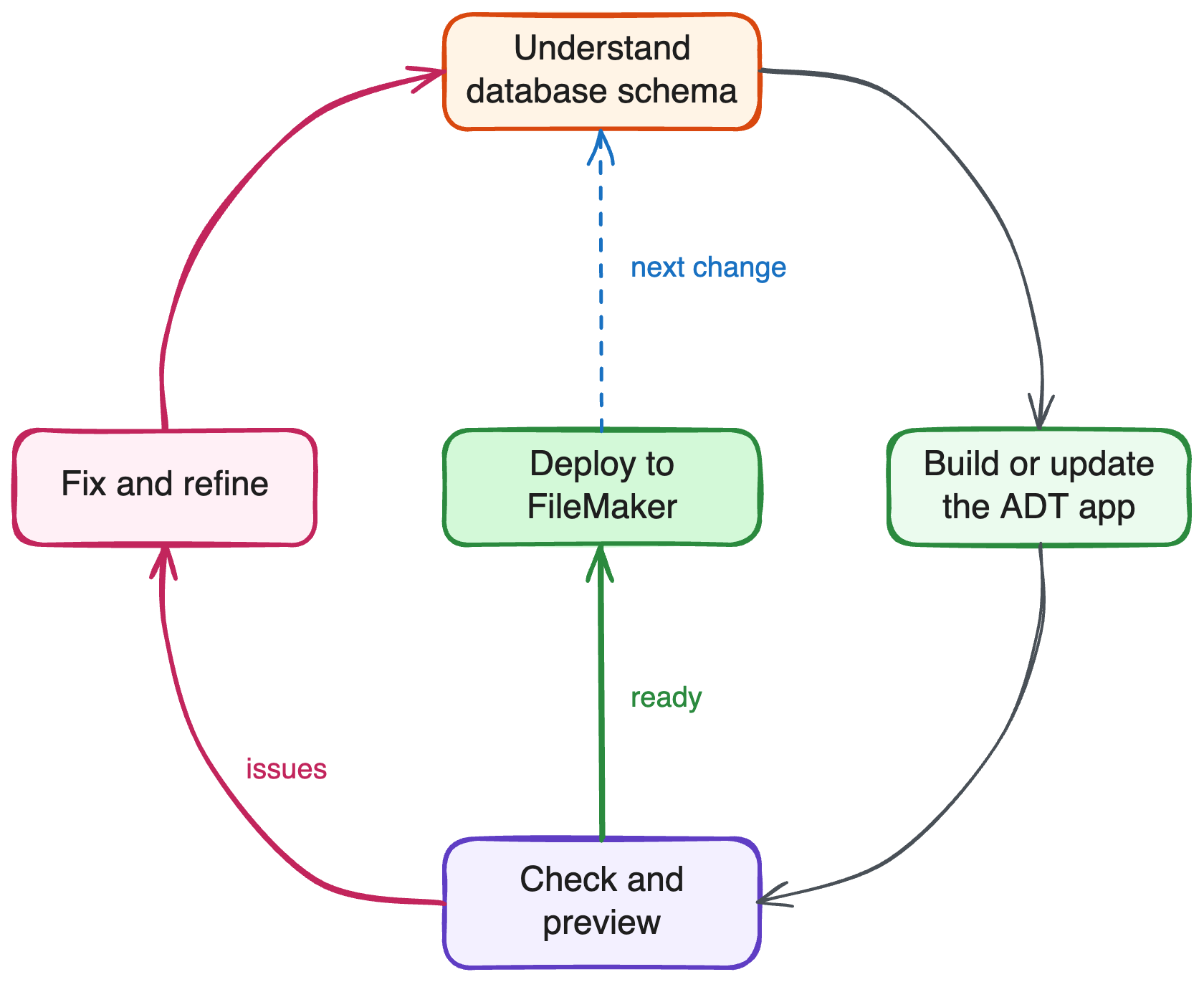
This is the loop to expect for the rest of the project: the agent reads FileMaker schema, writes app code, typechecks and lints, previews the result in a browser, fixes anything that's wrong, and repeats — until a change is ready to deploy back into FileMaker.
Style and theme
ADT projects use Tailwind and shadcn/ui, so the agent can restyle the app by editing normal project files — no ADT-specific mechanism needed.
A theme controls the colors, typography, radius, and other visual choices shared by the app. See Theming to explore shadcn/ui Create and TweakCN, then apply a theme safely with your agent.
Reference docs
-
Explore Your File for how the agent discovers tables, layouts, and relationships before it starts building.
-
Generate and Use a Typed Data Client for how the generated app reads and writes FileMaker data once it's more than a static preview.
-
Troubleshoot ADT if the dev server won't start or the connection drops.
-
Web Viewer Apps for the hybrid app model behind what you just scaffolded.
-
fmBridge() for how the dev server's script calls reach your connected file.
Next step
When the app works locally, continue to Deploy to FileMaker.